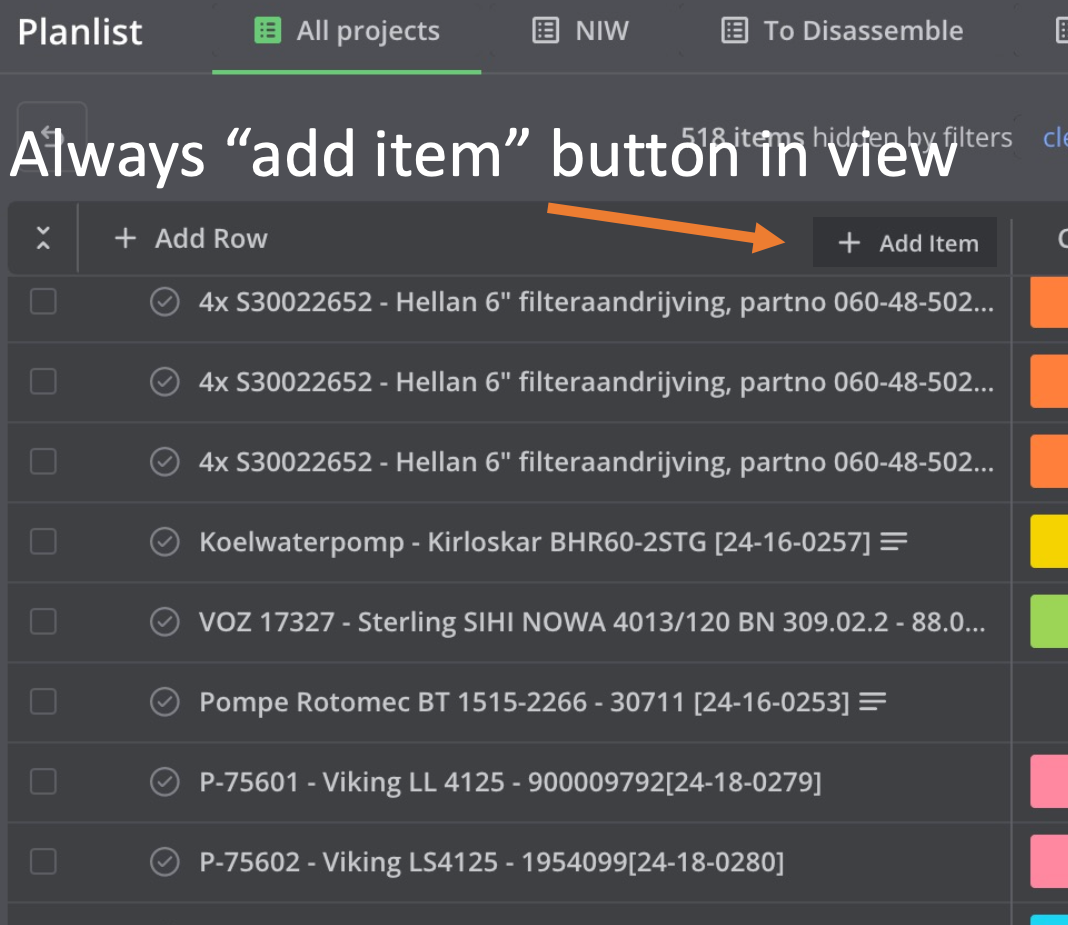
Additional [+ Add Item] button at the top of a Row
The [+ Add Item] button is currently at the bottom of each row. When there are many items in a row in either Gantt or List view, you have to scroll all the way down to reach it. Therefore, adding an extra button at the top of each row – like in the screenshot – would be very convenient.
Log in to comment and vote
Comments5
michael de decker
Jul 29, 2025
Hi Vidas, thank you for adding this feature.
If i can make a minor suggestion, would it be possible to automatically scroll/jump to the newly added item?
It's convenient that we don't have to scroll to the bottom of a long list of items before we can add a new one, but if you need to add any information outside of the title, you still have to scroll all the way down.
Vidas
Jul 29, 2025
michael de decker: yes, this is the annoying part which we were not able to address. We are keen to solve it and have UX exactly as you said, but the problem is that Teamhood virtualizes scrollable lists in order to be fast to load/use. If we were to have that auto-scroll on item add - it would force instant lag due to all items being loaded at once. This is not excuse, but a transparent reason why it has not yet been done. Nonetheless, we will do our best to make it work. For now - faster way to edit newly added item would be by clicking on green notification's title.
Jul 29, 2025
We have released "sticky" version of add button, it's not at the top but always at the bottom, so no scrolling is required.
Jul 24, 2025
Jul 10, 2025