Can you please check whether child item value summing is enabled via customization menu? Because it should aggregate dates. If enabled and you still not see the value - it might be a bug actually. But I will wait for your confirmation whether setting is turned on or off.
Daniel
•
Aug 31, 2023
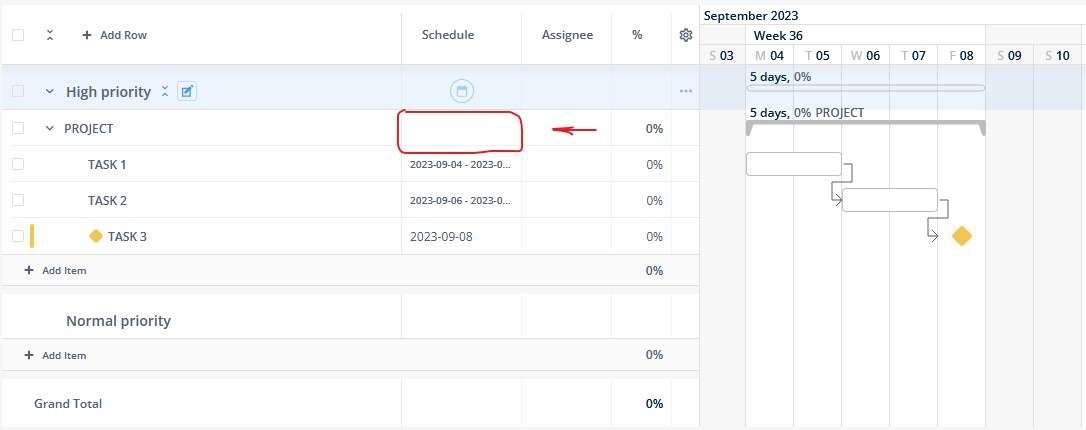
Vidas: It is on and I assume it is on by default. Tried once more to see whether the dates aggregate.
It appears that the values on the Gantt chart aggregate, but not the ones in the table.
Vidas
Team•
Aug 31, 2023
Daniel: I suspect it is another setting in Workspace settings. See image attached. But nonetheless, this made me think whether just view-only aggregation also makes sense for schedules. While the setting is all about actual value setting based on child item schedules.
Daniel
•
Aug 31, 2023
Vidas: that fixed the issue, thanks!
Regarding view-only aggregation for parent - I cannot imagine scenario where I would want to set schedule manually as the parent is fully dependent on schedule of its children.
While being pedantic and nitpicking - would it be possible to have same font size for the schedule. Currently mile stone and x d due, and date range have different font sizes.
Vidas
Team•
Aug 31, 2023
Daniel: regarding font sizing, yes this is sketchy decission from our side just to ensure long date formats take less space. As you brought it up, I will use this as a trigger for additional UX iteration.
Log in to comment and vote
Comments6
Aug 31, 2023
Vidas
Aug 30, 2023
Can you please check whether child item value summing is enabled via customization menu? Because it should aggregate dates. If enabled and you still not see the value - it might be a bug actually. But I will wait for your confirmation whether setting is turned on or off.
Daniel
Aug 31, 2023
Vidas: It is on and I assume it is on by default. Tried once more to see whether the dates aggregate.
It appears that the values on the Gantt chart aggregate, but not the ones in the table.
Vidas
Aug 31, 2023
Daniel: I suspect it is another setting in Workspace settings. See image attached. But nonetheless, this made me think whether just view-only aggregation also makes sense for schedules. While the setting is all about actual value setting based on child item schedules.
Daniel
Aug 31, 2023
Vidas: that fixed the issue, thanks!
Regarding view-only aggregation for parent - I cannot imagine scenario where I would want to set schedule manually as the parent is fully dependent on schedule of its children.
While being pedantic and nitpicking - would it be possible to have same font size for the schedule. Currently mile stone and x d due, and date range have different font sizes.
Vidas
Aug 31, 2023
Daniel: regarding font sizing, yes this is sketchy decission from our side just to ensure long date formats take less space. As you brought it up, I will use this as a trigger for additional UX iteration.