Board title - configurable field (list/gantt/dashboard)
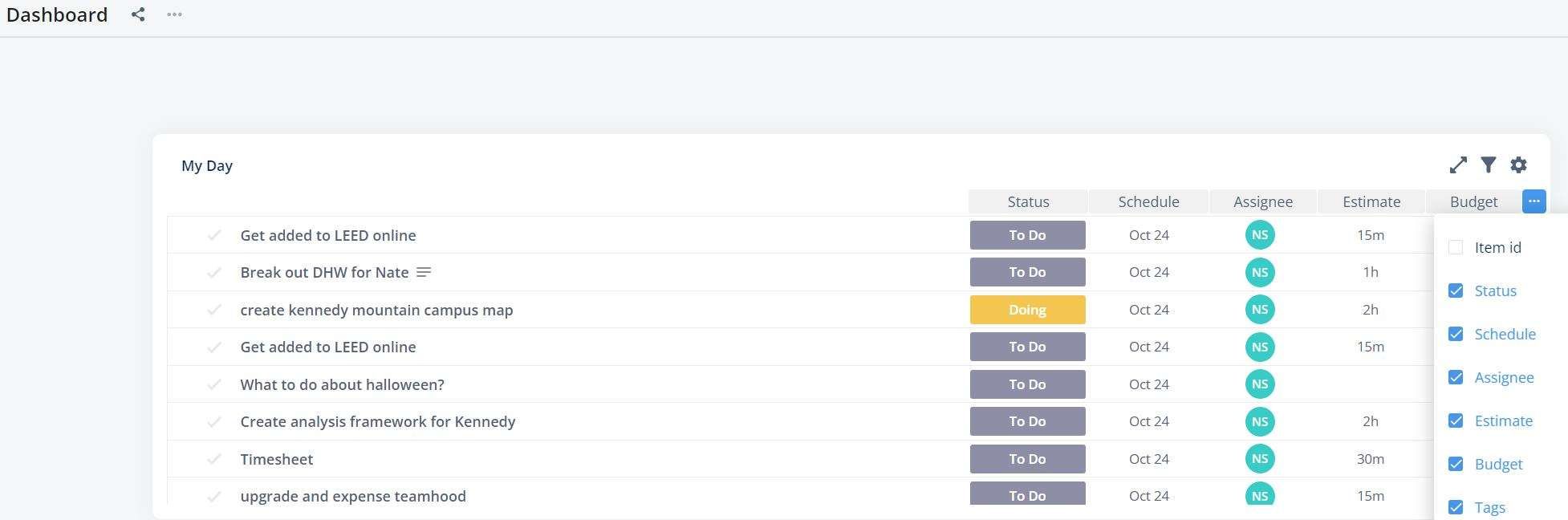
I created a dashboard with a widget for the tasks I need to do today (similar to Microsoft's My Day). It is a nice view, but I can't see what board the tasks are from. For example, I have two tasks with the same name, but they are on different boards. Please add the ability to have a column with board name. Row name would probably be helpful too.
Log in to comment and vote
Comments10
Feb 6, 2025
Feb 3, 2025
Jan 28, 2025
Alex Brodersen
Jan 27, 2025
I think this is really needed for "item list" widgets in dashboard type reports within workspace. Would this be straightforward to do?
Vidas
Jan 28, 2025
Alex Brodersen: will do our best to make it happen. Merging it with other similar requests to raise priority.
Vidas
Jun 20, 2023
In which reports would you like to have this improvement? Timeline and/or workload?
Katharina
Jun 20, 2023
Vidas: Thanks for your reply! In the first place for workload report, on the long run also for the timeline.
Vidas
Jun 20, 2023
Katharina: got it. In Timeline we do have a grouping option, which kind of does similar thing, it is just way easier IMO to present child items together with parent items, please see the image attached. Maybe you could leverage timeline if by any chance you are not using hour limits?
Katharina
Jun 27, 2023
Vidas: Hello Vidas, thanks for showing the option above - unfortunately we do need and mostly plan to work within workload report. The grouping option ist not availiable in workload report?
Vidas
Oct 25, 2022
Nick thank you for bringing this up. We already have it in our item field considerations list. The only dilema remains: should we combine board / row or allow picking them separately. Combo example: "Board title / Row title". It would require more space, though it would be only one field, and on hover user can see full location info. What do you think?