GANTT - show tasks on every page of print
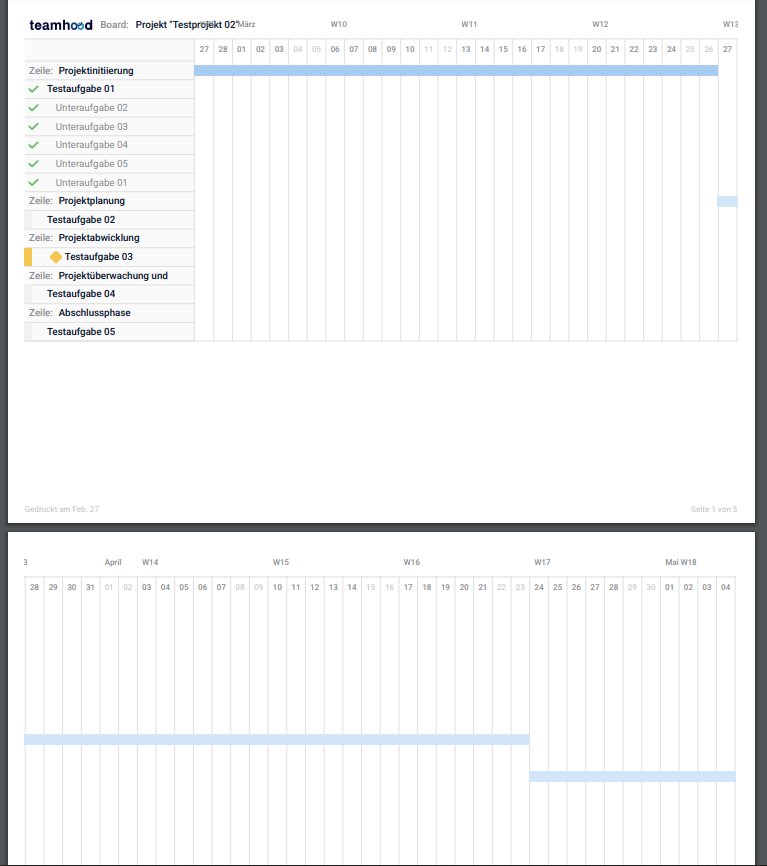
For our Use case it would be necessary that the tasks are shown on every site of the print. As you can see on the screenshot, its not possible to link the timeline to the task (if you dont print it on paper and place it beside the first page).
Log in to comment and vote
Comments17
Jul 19, 2023
Jul 5, 2023
Jul 5, 2023
Malte Feldmann
Mar 16, 2023
Thanks for the fast response! That workaround might work for smaler projects. But we wanted to plan big projects (6-18 month) with teamhood and send the gantt to the different companies with their tasks, so everyone knows when its their turn in the project.
Vidas
Mar 17, 2023
Malte Feldmann: ok that makes sense. Another quick question - what if left side has more fields than a single page can fit? For example assigned user, schedule, budget etc. are visible and calendar part barely fits. Would you then unselect some fields in export or would you still take those fields and expect Teamhood to fit more stuff on every single page?
Malte Feldmann
Mar 17, 2023
Vidas: I think, then the zoom option is a great way to display all fields. The best would be if you just duplicate the "left cell" with all information on every site - maybe you can integrate as a option (in export menu), so the user can choose between the standard where it is displayed only on first site and the option to display it on every page.
Vidas
Mar 17, 2023
Malte Feldmann: yes, configurable option is definitely the best.
Vidas
May 11, 2023
Malte Feldmann: it has not been prioritized yet so no ETA, sorry. We will have our major planning session closer to the end of this month, expect an answer by then, if it is a relatively small item we will do it.
Vidas
Jun 12, 2023
Malte Feldmann: no good news for now. Not prioritized among the list of other items.
Vidas
Jun 12, 2023
Malte Feldmann: I completely understand that such answer is not satisfactory. You, as an enterprise customer, already have a priority against myriad of other requests. I cannot provide you a fixed date because that is too risky. It can take anything from 2 weeks to 2 months for your request to reach the daylight. I will update status of this request once it is committed to our active sprint. This will be a signal that in 2-3 weeks you will receive the requested feature.
Vidas
Jul 5, 2023
Malte Feldmann: good news, your request has been pulled into current sprint and will most likely be released mid-July.
Vidas
Mar 16, 2023
Makes sense. I can offer one quick workaround which might work - choose weekly mode when exporting, then it will fit more days in one page. Of course it is not the same as daily mode, but you might be able to see full schedule of all tasks. What do you think?