Gantt Start Date
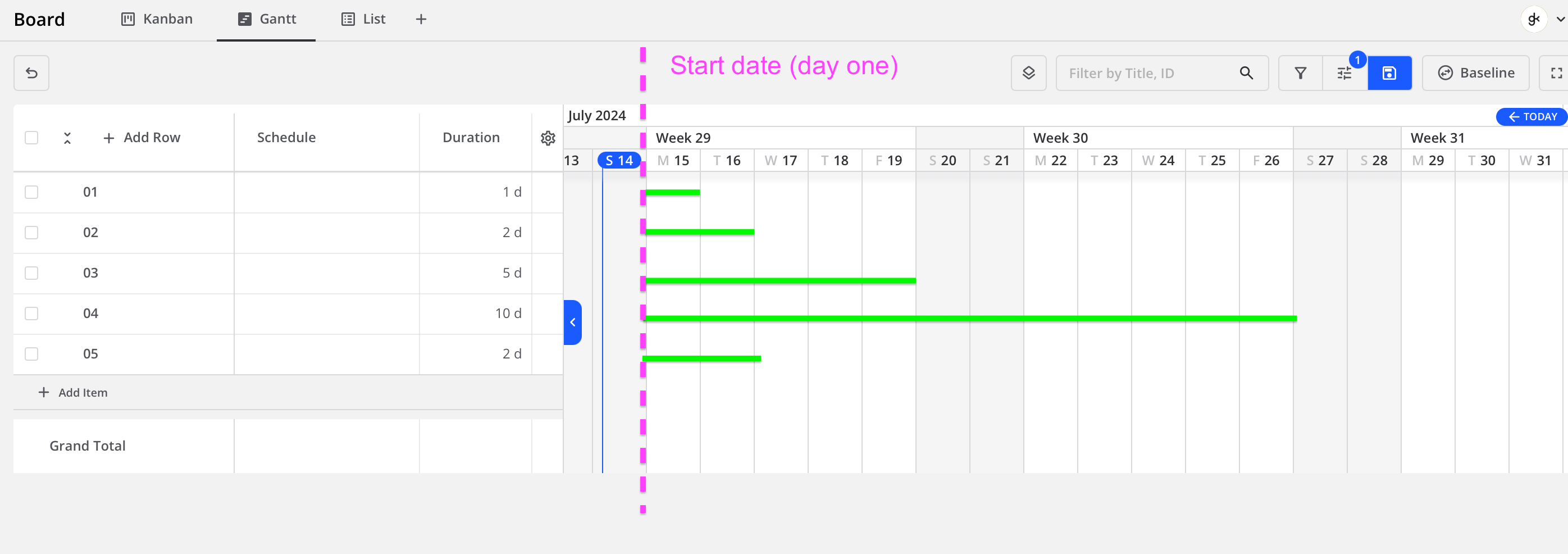
When creating new Tasks they all should automatically appear on the chart on the DAY 0 position (or on previously set START DATE of the whole Gantt Chart / project). At the moment all new Tasks do not appear until their respective dates are manually set, what is incredibly time consuming and counterproductive.
Log in to comment and vote
Comments5
Jan 10, 2025
Dec 10, 2024
Vidas
Jul 18, 2024
Giedrė | 2L thank you for this super clear suggestion. Few questions to clarify how would you expect it to work:
As a user you could set a start or due date for any board. Which would symbolize start or finish of project. Would that be the best, meaning once you create a board you can configure it's settings for schedule?
What if board has both start and finish dates? Default items to start date?
Should it have a default start date which is set during current date when creating a board? Or default to empty?
When I create new item in Gantt, and it defaults to start date, should it always default to 1 day duration as well? (No duration was set by default now)
Giedrė | 2L
Jul 29, 2024
Vidas
yes
Don't know :) My opinion board should have start or finish date only .
It could be Today, but definitely should be possibility to change. And ALL gantt must react to this.
Yes. My opinion 1 day should be enough.
Giedrė | 2L
Jul 14, 2024
Creating Gantt chart should be possible without setting any specific dates as sometimes it's needed just to calculate total duration, working hours etc.
Depending on situation one should be able to set (and lock!) charts START or FINISH date and all the tasks in the chart should then recalculate their duration according weekends, holidays etc. Gantt should be automatically created forward from fixed START or backward from fixed FINISH.