Show individual child items in Gantt view when the parent item is collapsed
We often need to report our project timetable for the client, but TeamHood pdf-exports are almost useless for this purpose.
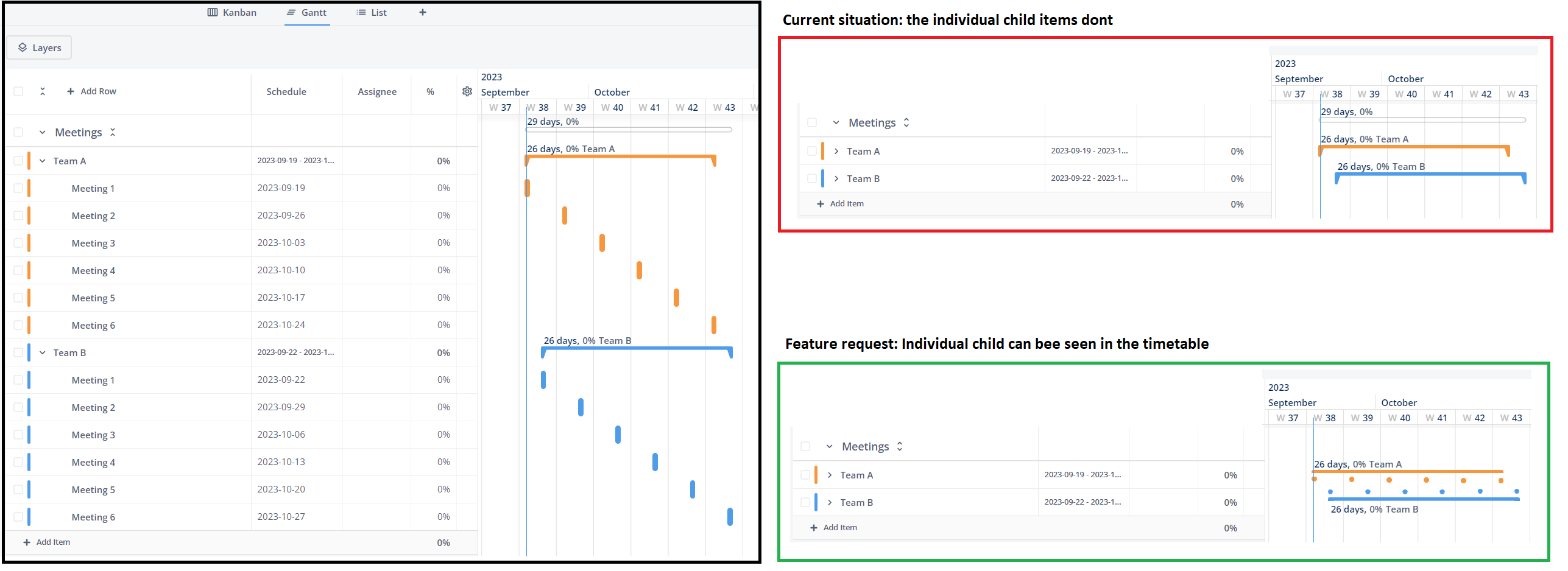
One huge improvement would be if the child items could be presented separately in Gantt view when the parent item is collapsed (see the picture). Child item "dots" could have item names hanging above them (ie. "Meeting 1").
We cannot send forward timetables where every item is expanded, because then the readability of timetable suffers a lot. Rows should fit to one A3 (pdf) page when exported.
Log in to comment and vote
Comments2
Vidas
Sep 19, 2023
Hey Mikko Ailisto I understand why you need it, but I am concerned that proposed solution will work only for presented case. If there are overlapping or parallel child items, it would end up messy straight away. On the other hand, talking about .pdf export, if we were to find a way to fit gantt into single A3/A4 page, would that be an alternative solution?
Mikko Ailisto
Sep 20, 2023
Vidas: Thanks for the quick response!
Okay, I see the problem with overlapping/parallel child items. Maybe if the row height would change automatically and fit the contents (see the picture), the view wouldn't get messy?
Fitting gantt into a single page would be great! Also I hope there was a option to hide certain rows/items before exporting. For example, client doesn't need to see information what we've set in TeamHood for our internal project management.