Show start & end date on Kanban cards
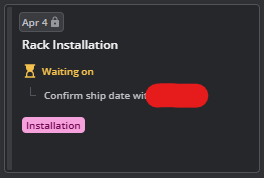
In the attached screenshot, I have a task scheduled for March 31st-April 4th. This is not super useful and at times even misleading for two reasons:
I can't see what the start date (or even the duration) is for this task in the current view. I have to either click on the card to expand details or enter Gantt view.
It's not obvious that this is the end/due date for this item, other than just knowing from experience.
I would like to see beginning and end dates shown on the card, or at the very least an explicit indication that the date shown is the due date.
If this is already a setting somewhere, please point me in the right direction. TIA!
Log in to comment and vote
Comments1
Vidas
Feb 23, 2025
Hey Alfredo Arpero for now it's not possible to show both start and due date on Kanban card. We focused on showing deadline only, as Kanban is less about timelines and more about the flow of work. One thing that could help you is either enable duration field which would indicate that item has different start date if duration >1 or you could create a custom field of type formula and just add start date as a single value to formula. Then enable that field to be shown on the item cards. Let me know if it's clear enough what I am proposing.